

If you’re experiencing issues with Mix to Mobile, Sound on Digital Support may request diagnostics files to help diagnose the problem or gain insights into your environment. Mix to Mobile includes a feature that allows you to easily generate and share a zip file containing all the necessary information.
What the Diagnostics File Includes:
- Log Files: All logs from Mix to Mobile, including system logs on Android.
- Audio Devices List: Information about the audio devices connected to your system.
- Build Information: Details about the version and build of Mix to Mobile you’re using.
- Network Interfaces: A list of network interfaces on your system.
- System Information: General details about the system running Mix to Mobile.
- Locale Information: Information related to your system’s locale settings.
- Firewall rules: Information about the firewall configuration (Windows)
How to Generate and Share a Diagnostics File:
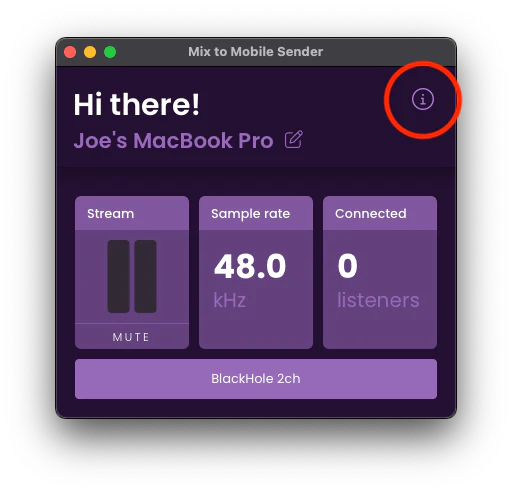
Click the Information (i) Button:
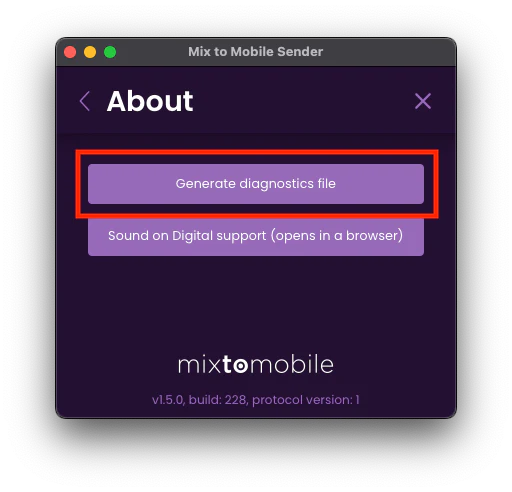
Select “Generate Diagnostics File”:
Save or Share the File:
- On Desktop: You’ll be prompted to save the zip file to your computer.
- On Mobile (iOS and Android): A share popup will appear, allowing you to send the file directly.
In most cases it’s important to send us diagnostics from both the sender on your computer and from your mobile phone, so that we can see both sides.
Once you’ve saved or shared the diagnostics file, please send it to support@soundondigital.com along with a clear description of the issue you’re experiencing.